LeanGym Log
Your training log for iPhone, iPad and Apple Watch. No subscription, no account, no ads.
Try it free for 14 days, then a one-time €5.99
Workouts in Notes?
Weights, seat heights, reps – somewhere between the shopping list and a row of question marks. Next session, you no longer know whether it was 30 or 32.5.
Your notes come along. The app reads workouts from notes as text, from Strong, Hevy and CSV spreadsheets. You see a preview before importing.
- Mon Push
- Bench prses 80x8 80x7 80x6?
- Incline DB 30s or 32.5??
- Butterfly seat 4 or 5 ???
- Lateral raises 12s … 13?
- Triceps cable 35 i think
- Wed Pull
- Lat pulldown seat ?? 77.5x9 77.5x8
- Cable row 60x10 60x9
- Face pulls 20? 22.5?

Skip the hassle.
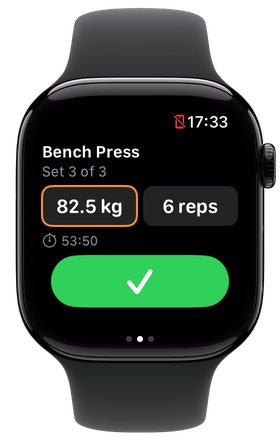
You want to train, not type. Empty fields show your numbers from last time, and one tap takes them over.
- Rest timer starts by itself – extend, shorten or end it
- Apple Watch and Lock Screen show the rest and your next set, and you can tick it off there
- New personal bests show up right away, while you train
- Supersets, drop sets, warm-up sets, single-arm work, bodyweight and holds
- Plate calculator and warm-up in every exercise’s menu
And train like a pro.
The analysis works from your own entries: how your strength develops, which muscles fall short and how high your load is right now.

Strength progress per exercise.
For every exercise you see your estimated max (e1RM), your best and the change. Also where the exercise came in your workout – that affects performance.

The history of one exercise.
Estimated max, heaviest weight or work as a curve – over one month, three months, a year or everything. Below, every workout with all sets.

Your week on a figure.
Sets per week per muscle: not trained, too low, in target range or very high. You see at a glance what falls short.

Keep an eye on your load.
Sessions and work per week, and your load over the last seven days compared with your average.

New bests stand out.
When you do more than ever before, the analysis shows it – with exercise and number.
All analyses are estimates from your entries. What they are based on is explained under Methods & sources.
With your personal coach.
Ask in your own words, for example: “How do I get stronger on bench press faster?” The coach looks at your workouts and answers with the big picture, what’s going well, what’s holding you back and what to do next.
With Apple Intelligence right on your iPhone, or with your own key for an AI service. Without either, the app stays fully usable.


Who knows more than just your sets.
Log body weight, sleep and nutrition too, if you like – food also via barcode scanner. The coach takes them into account in its answers.
- Each area can be switched on separately
- Supplements and alcohol can be added if you want
- Apple Health: read weight and sleep from it, write workouts and weight to it
Because you log everything precisely.
A lat pulldown on one machine feels different from the next: different levers, different weights, different settings. That’s why an exercise can belong to a station – then you compare your numbers on exactly that machine.


Even the range of every machine.
Place your iPhone on the top plate and do a few reps. The app measures how far the weight travels and remembers it for the station.
- Work instead of tonnage: the app uses the distance the weight travels
- Fair comparisons: machines with short and long levers can be compared
- No iPhone needed either: measure with a tape measure and enter it by hand

Over 400 animated exercises.
A figure shows you the movement, as a man or a woman. The muscles doing the work are highlighted. In the app, a few sentences below tell you what to watch out for.
Bench Press
Target: Chest · Assisting: Front delts, triceps
Deadlift
Target: Lower back, glutes, hamstrings · Assisting: Forearms, neck, quads
Pull-Ups
Target: Lats · Assisting: Biceps, upper back
Pec Deck
Target: Chest · Assisting: Front delts
Face Pulls
Target: Rear delts · Assisting: Upper back
No subscription, no account, no ads.
Try it free for 14 days, then a one-time €5.99.
Full version
€5.99one-time
- All features free for 14 days
- One purchase – no subscription, no extras
- Without purchasing, your entries remain viewable and exportable
€5.99 in Germany; the store shows the price in your country. Purchase and billing are handled by the App Store.
Your data stays with you.
- No ads
- No account, no sign-in
- No tracking, no analytics services
- Your entries live on your devices – and, if you like, in your own iCloud
Only what you switch on yourself leaves your device: the barcode scanner’s online product search (just the barcode number, to Open Food Facts) and, with your own key, your question to the AI service you chose. More in the privacy policy.
What else the app does.
A plan that fits you.
Tell the app what you want to achieve, how often you train and what your gym has. It suggests a plan – or you bring your own.
- Goal and effort – such as build muscle, twice a week
- Suggest a plan from goal, time and equipment
- Programs – ready-made plans over several weeks
- Plan from text – paste your coach’s plan and use it
- Weekly plan – what’s on which day, with your next workout

From catalog to history.

Every exercise exists once.
Each exercise appears exactly once in the catalog – no matter which gym you do it in. Filter by muscle group or type, such as basics or machine. Missing one? Add it yourself.

Your gym and its stations.
Add the machines you train on: leg press, lat pulldown, dumbbells. Stations are optional – without one, an exercise counts for the whole gym.

Templates for your sessions.
A template holds exercises from the catalog. Start it in your gym and the app uses the matching station there for each exercise. Ready-made templates and full programs are in the library.

Log, tick off, rest.
Empty fields show your numbers from last time at this station. Tap the circle to take them over and tick off the set. Then the rest timer starts.

Every workout in detail.
Duration, sets, work and new personal bests. You can edit, add to or share a workout later.
Frequently asked questions
Do I need stations?
No. Stations are optional. Without a station, an exercise counts for the whole gym; with a station, your numbers are comparable on exactly that machine.
What does the app cost?
All features are free for 14 days. After that, the full version is a single one-time purchase (€5.99 in Germany). There is no subscription.
What happens after the 14-day trial if I don’t buy?
You can still view and export all your existing entries. You need the full version for new entries.
Where is my data stored?
On your devices and, if you turn on sync, in your own iCloud. There is no account and no server run by the provider. Details are in the privacy policy.
Do I need Apple Intelligence for the coach?
No. Without Apple Intelligence you can add your own key for an AI service. Without either, everything else works as usual.
Can I bring my workouts from another app?
Yes. The app imports the CSV exports from Strong and Hevy, other CSV files and workouts from your own notes as text. You see a preview before importing.
Is there an Android version?
First for iPhone, iPad and Apple Watch. Android is coming later.
More answers on the support page.
Ready for your next workout?
LeanGym Log is coming to the App Store soon. Follow us on Instagram to be the first to know.
LeanGym Log is a training log, not a medical device. Estimates and hints in the app – for example on nutrition values or training load – are not medical, dietary or training advice.